Journeys
Journeys
Build, review, dry-run, and start lifecycle automations.
A Journey is a lifecycle automation: people enter through one or more triggers, walk a graph of steps, and either convert (goal), exit, or sit in a holdout. Nothing sends until you Start after Review is green. Once live, the Journey sends automatically under its rules; you do not approve each individual delivery.
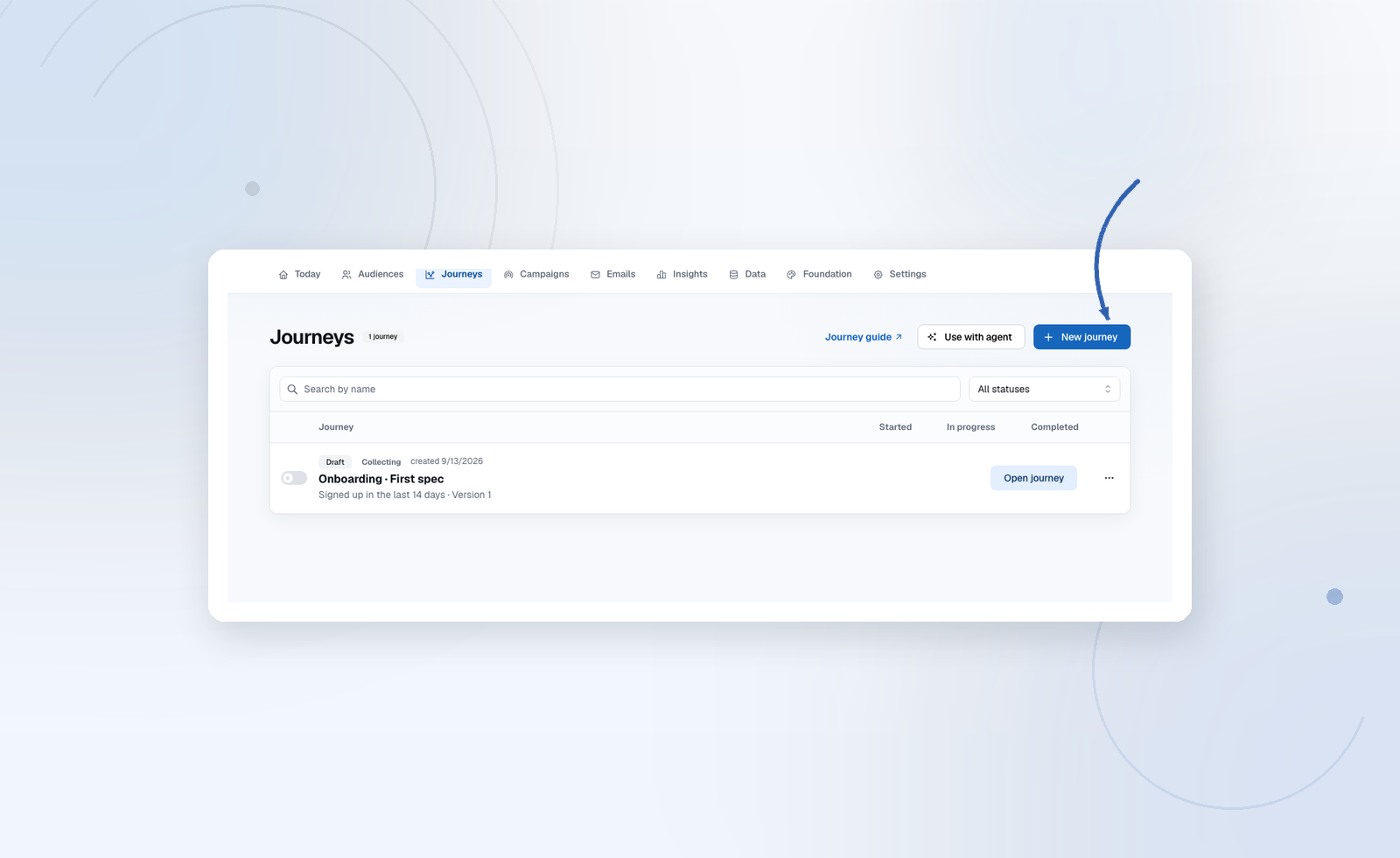
Create one
Journeys → New journey:
- Onboarding, Reactivation, Nurture, or Blank — pick an audience and a conversion goal.
- Describe it — a sentence of intent; Audryo drafts the graph. You still edit and approve.
You always land on a real canvas, not a black box.
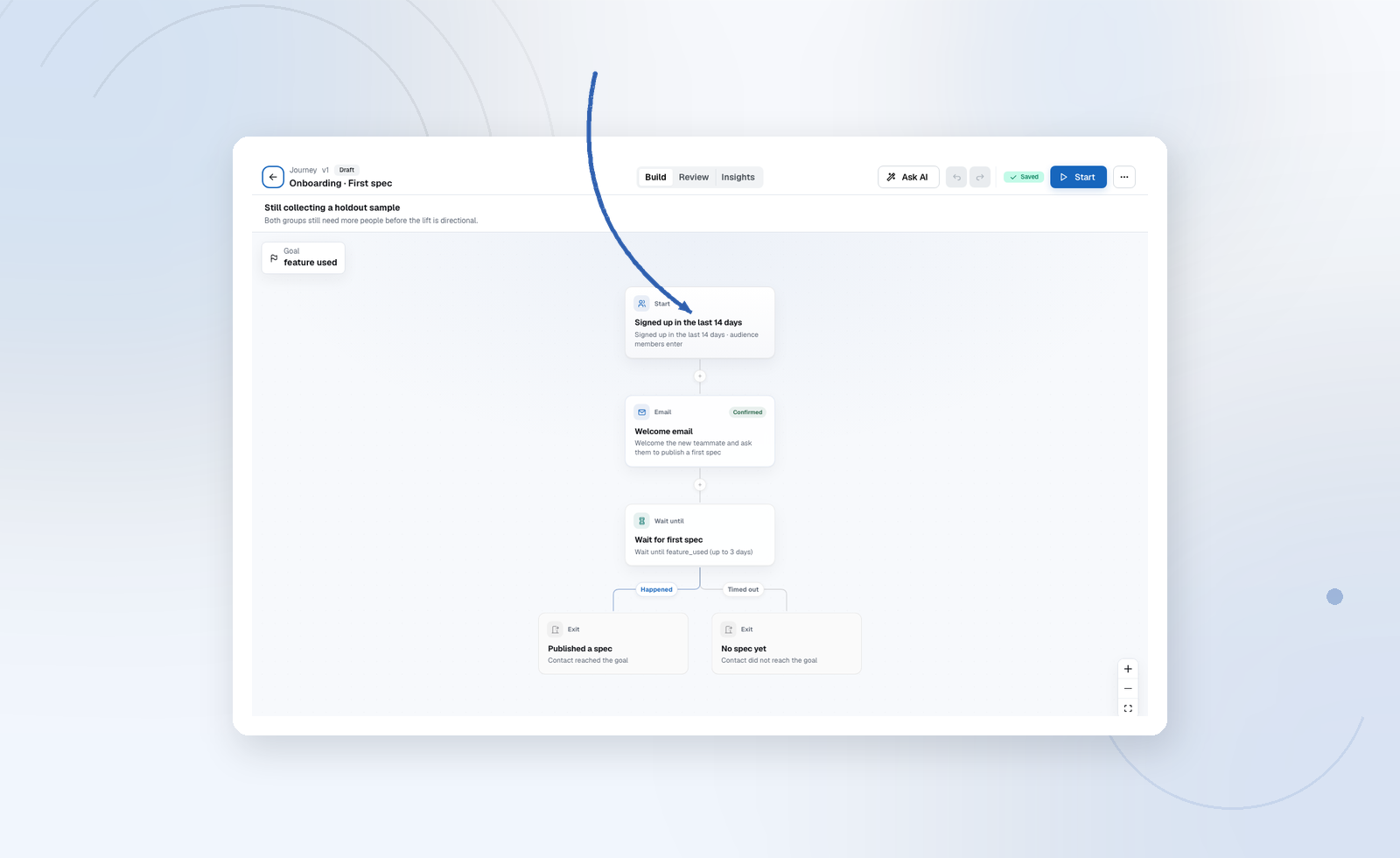
Design, then copy, then go live
- Structure: entries, steps, goal, holdout, frequency.
- Emails: Publish every locale on every email node.
- Review checklist + dry run.
- Start. Pause anytime.
Structure approval and email publishing are separate gates. You can accept a graph without publishing its emails in the same click. These checks apply to the Journey and its email versions before launch, not to each recipient or delivery.
You can also manage this entire process with your agent in Cursor, Codex or another connected client: review the Journey and emails in chat and explicitly approve the launch. With Send and go live (deliver) access, your agent can publish the reviewed emails, run the dry run, approve and activate the Journey on your behalf. Later revisions need review before they go live.
Organise journeys in folders
Choose New folder to organise journeys into areas such as Premium or Free. Folders have one level and each journey belongs to one folder, or Unfiled. Expand several folders together; Audryo remembers collapsed folders for your user and project in this browser. Search and status filters apply across all folders, match folder names as well as journey names/descriptions, and automatically expand matching groups. Counts show visible versus total journeys when filtering.
Drag a journey by its handle onto a folder header or contents. Hover over a closed folder to expand it. Alternatively choose Move to folder… from its menu, which also works with keyboard and touch. A successful move offers Undo. Removing a folder moves its journeys to Unfiled and preserves their configuration and history.
Folder assignment applies to a journey's entire lineage, including new and restored versions. It does not change approval, runtime, participation rules or create a new version. Agents can use list_journey_folders, create_journey_folder, rename_journey_folder, delete_journey_folder and move_journey_to_folder through MCP. The move endpoint is PATCH /projects/{projectId}/journey_folder_memberships/{lineageId} with folderId, expectedFolderId (both nullable) and expectedRevision. Read the current folderId and folderRevision from workflow_context first; a concurrent move returns 409 rather than overwriting someone else's organisation. Folder endpoints require write scope for mutations and remain project-scoped.
Canvas overview
The Journey overview card shows the trigger, communication type, conversion goal and participation rule count. Choose Edit goals & rules to edit the description, goal, participation and sending rules. Active journeys also show compact performance cards and a link to Insights. Draft changes save automatically and support undo/redo; live journeys require a new reviewable version. The Journey list shows the communication type and consent requirement; its search still matches descriptions as well as names.
The settings sidebar uses the same collapsible panels as the email editor. Starting point groups the journey and audience, entry trigger, entry behavior, and additional triggers. Goals & rules keeps purpose, conversion, communication, participation, frequency and impact measurement in one rail. Collapsed panels summarize the current settings; invalid participation rules and purpose errors stay visible. Email steps show Email content and Delivery panels; use Email language to work on one language variant at a time. Other step types group timing, conditions, paths or actions as appropriate. Collapsing a panel preserves edits; use the journey save action to save the full configuration.
Journey participation rules
In Goals & rules → Journey participation, choose one or more journeys and whether the contact has never entered any, is not currently in any, has entered at least one, or is currently in at least one of them. Every rule must match at entry. History covers all versions of each selected journey. Live and sandbox histories are separate; holdouts and denied entry attempts are not participation. Contacts waiting at a delay or blocked after successful entry still count as current participants. Completed and exited participants count for history, but no longer for current participation.
An excluded entry is recorded with its reason in the contact profile and counted separately in Insights. It sends no email, does not enter the comparison experiment and is not automatically queued for later entry. These rules do not stop people already inside the journey. Future trigger occurrences are evaluated under the existing re-entry policy. Use frequency limits separately to manage email pressure across journeys and campaigns.
Agents set the same rules through specification.guards, for example:
{
  "type": "journey_participation",
  "operator": "not_currently_in",
  "journeyIds": ["<lineageId from list_journeys>"]
}
journeyIds are lineage IDs, not individual version IDs. References must belong to this project; a journey cannot reference itself. Optional guard fields are normalized by the API. Multiple IDs use any-match semantics; multiple guards are combined with AND.
This text is separate from the conversion goal: the confirmed event used to measure success. Agents read and maintain the same description through specification.objective (10–2,000 characters).
| Step | Role |
|---|---|
| Start | Who enters and why (audience, event, field, signup, birthday) |
| One message document | |
| Wait / Wait until | Time or “until this happens” |
| If / else | Branch on field, event, or tag |
| A/B split | Random email test |
| Set field / Tag | Write the profile for later segments |
| Webhook | POST this moment to your stack |
| Exit | End with a reason |
Full behavior: Journey steps. Triggers and reentry: Triggers. Holdout, pause, dry run: Holdouts.
Ask AI
Describe a change in plain language. You review a diff. Nothing applies until you accept.
Event data in emails
When entry is an event, that event’s properties are {{ data.<key> }} for this enrollment only, snapshotted at entry. Audience triggers have no data. Details: Personalization.
Blocked is working as designed
People blocked on Insights or the runtime panel failed eligibility (consent, suppression, blocklist, or an unverified domain on a live project). Fix the cause; Audryo retries. Do not re-add them manually.